

Cross-process · Materials & Inventory
The foundation under every end-to-end process
Where is it, how many, and what's it made of?
Material master, bill of material, stock across plants, the story behind a movement - the questions your plant and warehouse ask all day, answered without MM03, MMBE or the one colleague who knows the transaction codes. In Teams, in Outlook, across whole lists.
The grind today
Materials management runs through three transaction codes and one expert.
Is the material maintained for this plant? Which storage location actually has stock? What sits inside that assembly? And what was that 5-something movement type on the document? Today each answer needs SAP navigation skills most of the plant doesn't have - so the questions queue up at the people who do.
A real exchange
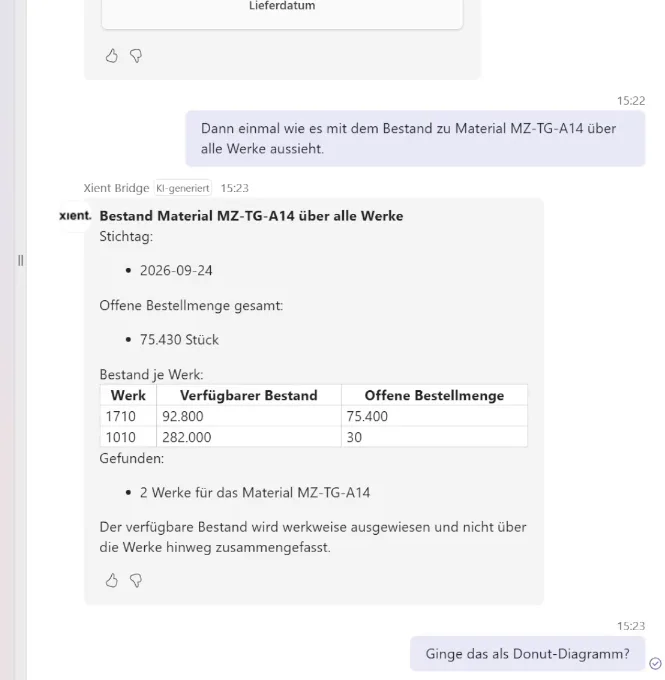
Stock, locations and movements - in one answer.
Four surfaces, one warehouse
From the shop floor to the master data office.
 In Teams
Stock checks, BOM explosions, master data lookups - answered in the channel, on the phone in the warehouse aisle, without a single transaction code.
"What goes into assembly 100-100 - full BOM?" In Outlook*
A supplier writes about a material: pull master data, open orders and current stock into your reply. A material number mid-email? One question away.
"What do we know about the material this supplier mentions?" In SharePoint*
A list of materials from a project or an audit: Bridge checks the whole batch for master data completeness and current stock - and files the findings back.
"Check this material list for gaps and stock." In Excel*
A material number in a cell: stock, plants and master data status behind it - right in the sheet. Later phase: Bridge writes the findings back into the list.
"Stock and master data for the material in A2?"Company knowledge
Your movement types. Your conventions. Explained.
Every SAP landscape grows its own movement-type conventions - the custom types, the "we always post it this way" rules, documented in an MM guideline somewhere in your workspace. Bridge reads those conventions alongside the live document from SAP: not just "movement type 551", but what 551 means in your company and when to use it.
Under the hood
What Bridge reaches. What it can do.
Data sources
- Material master data, per plant and view
- Bills of material
- Stock per plant and storage location, by stock type
- Material movements and documents, with movement types
- Your MM guidelines and conventions - from your Microsoft 365 workspace; SAP data via released standard services, ECC and S/4HANA
Capabilities
- Find materials and check master data across plants
- Explode bills of material
- Check stock and stock types, spot shortages
- Trace movements and explain movement types - including your own conventions
- Flag master data gaps - and maintain material master data*
*Outlook, SharePoint and Excel arrive in a later release. Write actions are planned for later phases - released explicitly, function by function, under your governance. Bridge starts read-only. Excel as a surface also arrives in a later release.
Every access runs through the user's own SAP account - nobody sees more than their SAP rights already allow. Everything stays in your Microsoft tenant, auditable end to end.
Materials run through purchase to pay, plan to produce and order to cash alike - see the full capability map →
Why it pays
Where the time comes back.
See it on your materials.
Thirty minutes, your plant's real questions, a live system.